使用者收到的退信紀錄如下:
#550 4.4.7 QUEUE.Expired; message expired
該錯誤訊息可能發生的原因是,郵件網域可能被列入黑名單中或者DNS反查的問題造成的,請透過下列工具來確認問題點,
並且尋求ISP廠商協助除錯
Blacklist Check
http://whatismyipaddress.com/blacklist-check
MX Lookup tool
http://www.mxtoolbox.com/
2012年4月23日 星期一

2011年12月18日 星期日
Exchange 2010 Outbound Mail Error
郵件可以正常收信但是無法正常發信,錯誤訊息如下:
451.4.4.0 Primary Target IP address responding with : "421.4.4.2 Connection dropped due to a ConnectionReset" Attempted failover to alternate host but did not succeed...
解決方法:
1. 確認DNS名稱解析是否正常
2. Firewall所提供服務Port是否有開啟
3. 在Exchange以及Exchange Edge上用Telnet溝通外部的郵件伺服器看看
*如果上述的動作都檢查了,另外第三步驟也確認無法與外部的郵件伺服器溝通,那可能您的ISP廠商有將服務線路過濾SMTP 25 Port所造成的,請ISP廠商線路重整,此問題即可解決.
451.4.4.0 Primary Target IP address responding with : "421.4.4.2 Connection dropped due to a ConnectionReset" Attempted failover to alternate host but did not succeed...
解決方法:
1. 確認DNS名稱解析是否正常
2. Firewall所提供服務Port是否有開啟
3. 在Exchange以及Exchange Edge上用Telnet溝通外部的郵件伺服器看看
*如果上述的動作都檢查了,另外第三步驟也確認無法與外部的郵件伺服器溝通,那可能您的ISP廠商有將服務線路過濾SMTP 25 Port所造成的,請ISP廠商線路重整,此問題即可解決.
2011年9月3日 星期六
EMC Initialization Failed
After installing the two Client/Hub/Mailbox servers I can not get into the EMC and get the following error:
Initialization failed
The following error occurred when getting user information for 'DOMAIN\administrator':
The operation couldn't be performed because object 'S-1-5-21-502790489-3747709401-3226269444-500' couldn't ge found on 'Servername.domain.com'. It was running command 'Get-LogonUser'.
上述問題為 SID 衝突造成 EMC 無法正常用作而啟動錯誤
解決方法:
1. 先將 EXchange 2010 退出網域
2. 退出網域後,重新開機登入
3. 開機登入後,執行 Sysprep
4. 執行 Sysprep 後,重新開機登入
5. 開機登入後,再將 Exchange 2010 加入網域
6. 加入網域後重新開機
7. 開機登入後,開啟 EMC 錯誤訊息不在發生,上述問題已解決
Initialization failed
The following error occurred when getting user information for 'DOMAIN\administrator':
The operation couldn't be performed because object 'S-1-5-21-502790489-3747709401-3226269444-500' couldn't ge found on 'Servername.domain.com'. It was running command 'Get-LogonUser'.
上述問題為 SID 衝突造成 EMC 無法正常用作而啟動錯誤
解決方法:
1. 先將 EXchange 2010 退出網域
2. 退出網域後,重新開機登入
3. 開機登入後,執行 Sysprep
4. 執行 Sysprep 後,重新開機登入
5. 開機登入後,再將 Exchange 2010 加入網域
6. 加入網域後重新開機
7. 開機登入後,開啟 EMC 錯誤訊息不在發生,上述問題已解決
2011年7月10日 星期日
Exchange 2010 #554 5.6.0 NDR
Exchange 2010用戶正常連線,傳送郵件至Internet沒有錯誤,但是由Internet傳送郵件至Exchange 2010用戶,會產生下列#554 5.6.0 NDR
#554 5.6.0 STOREDRV.Deliver.Exception:MailboxInfoStaleException.DatabaseNotFoundException; Failed to process message due to a permanent exception with message ExchangePrincipal ; DatabaseNotFoundException: 8146963c-c733-40a1-a82a-ac5c645a4602 ##
發生此問題的原因為Exchange DB所在的硬碟槽已經空間不足,請手動備份騰出硬碟空間,或者啟用循環記錄檔壓縮DB容量,完成上述動作重新啟用Exchange服務後,即可恢復正常.
參考資料:
http://technet.microsoft.com/en-us/library/bb331958.aspx
#554 5.6.0 STOREDRV.Deliver.Exception:MailboxInfoStaleException.DatabaseNotFoundException; Failed to process message due to a permanent exception with message ExchangePrincipal ; DatabaseNotFoundException: 8146963c-c733-40a1-a82a-ac5c645a4602 ##
發生此問題的原因為Exchange DB所在的硬碟槽已經空間不足,請手動備份騰出硬碟空間,或者啟用循環記錄檔壓縮DB容量,完成上述動作重新啟用Exchange服務後,即可恢復正常.
參考資料:
http://technet.microsoft.com/en-us/library/bb331958.aspx
2011年4月26日 星期二
DAG 的成員是否可以跨不同的AD Domain ( 相同的Forest )
查詢確認後您可以參考下列TechNet官方文件中的DAG Member需求
Planning for High Availability and Site Resilience
其中提到如下圖內容所述:

從上述內容可知 Exchange 2010 DAG 中的成員都必需要在同一個 Domain,所以您若要在不同網域中各建置一台 Exchange 2010 DAG Member 是不被支援的.
但您可以在不同 AD Domain 建置不同的 Exchange 2010 DAG 群組,例如:在 A 網域中建立DAG-A-Domain ,在 B 網域則另外建立一個 DAG-B-Domain 的 DAG 來提供 A 與 B 網域的高可用性.
或者,您可以將 A Domain 分割成兩個不同的 AD Site ,而其中一個 AD Site 建立在 B Domain 的 Location,如此便可以做到 A Domain DAG 的異地備援機制.
Planning for High Availability and Site Resilience
其中提到如下圖內容所述:

從上述內容可知 Exchange 2010 DAG 中的成員都必需要在同一個 Domain,所以您若要在不同網域中各建置一台 Exchange 2010 DAG Member 是不被支援的.
但您可以在不同 AD Domain 建置不同的 Exchange 2010 DAG 群組,例如:在 A 網域中建立DAG-A-Domain ,在 B 網域則另外建立一個 DAG-B-Domain 的 DAG 來提供 A 與 B 網域的高可用性.
或者,您可以將 A Domain 分割成兩個不同的 AD Site ,而其中一個 AD Site 建立在 B Domain 的 Location,如此便可以做到 A Domain DAG 的異地備援機制.
2011年4月23日 星期六
The Exchange Server 2010 Setup On Hyper-V Fails With 2147504141 Error
當在 Hyper-V 上執行安裝 Exchange 2010 ,在執行安裝過程中會失敗,並且產生下列的錯誤訊息,錯誤訊息如下 :
"An error occurred with error code ‘2147504141′ and message ‘The property cannot be found in the cache.’"
解決方法:
1. Open the Hyper-V Manager console.
2. Locate and Right-click the virtual machine on which you want to install Exchange Server 2010, and then click Settings.
3. Click the Management section in the Settings tab, and then click Integration Services.
4. Click to clear the Time synchronization check box, and then click OK.
5. Reinstall Exchange Server 2010 on the virtual machine.
或者參考此連結 : Error message when the Exchange Server 2010 setup on a Hyper-V virtual machine fails:“2147504141”
"An error occurred with error code ‘2147504141′ and message ‘The property cannot be found in the cache.’"
解決方法:
1. Open the Hyper-V Manager console.
2. Locate and Right-click the virtual machine on which you want to install Exchange Server 2010, and then click Settings.
3. Click the Management section in the Settings tab, and then click Integration Services.
4. Click to clear the Time synchronization check box, and then click OK.
5. Reinstall Exchange Server 2010 on the virtual machine.
或者參考此連結 : Error message when the Exchange Server 2010 setup on a Hyper-V virtual machine fails:“2147504141”
Can’t Install Exchange 2010 SP1 with Error
當在更新 Exchange 2010 SP1 時,會產生下列錯誤訊息,而造成無法繼續更新 SP1,錯誤訊息如下:
Some controls aren't valid. Setup previously failed while performing the action "Install". You can't resume setup by performaing the action "BuildToBuildUpgrade".
解決方法:
1. 開啟 regedit 並且找到下列機碼位置 HKEY_LOCAL_MACHINE\SOFTWARE\Microsoft\ExchangeServer\v14\
2. 在所要安裝的 Exchange 角色機碼裡,找到名稱為 Action 的機碼 (以此例為 MailboxRole)
3. 為了確保安全在執行任何修改的動作前,請確實備份
4. 找到 Action 機碼後刪除
刪除上述機碼後再重新執行 Exchange SP1 更新即可順利進行更新
Some controls aren't valid. Setup previously failed while performing the action "Install". You can't resume setup by performaing the action "BuildToBuildUpgrade".
解決方法:
1. 開啟 regedit 並且找到下列機碼位置 HKEY_LOCAL_MACHINE\SOFTWARE\Microsoft\ExchangeServer\v14\
2. 在所要安裝的 Exchange 角色機碼裡,找到名稱為 Action 的機碼 (以此例為 MailboxRole)
3. 為了確保安全在執行任何修改的動作前,請確實備份
4. 找到 Action 機碼後刪除
刪除上述機碼後再重新執行 Exchange SP1 更新即可順利進行更新
2011年4月8日 星期五
Windows NLB 或 Hardware NLB Solution 的差異或建議為何 ?
首先您必需先瞭解 Network Load Balance 的 Affinity Type 的差異。
下列列出各種 NLB Affinity Type 的說明:
Existing Cookies :
此種 affinity 的方法是使用Client/Server Session間所傳遞的Cookie資訊來進行 LOAD BALANCE 。
此種方法只適用於使用 HTTP 的通訊協定而不適用於任何 RPC 的通訊協定用戶端。
OWA 使用表單型驗證所以很適合使用此種 affinity 方法或使用 Application Cookies 的 Affinity 方法。
Load Balancer Cookies:
此種 Affinity 方法很類似於 Existing Cookies 。 Load Balancer Cookies是由負載平衡器來產生 Cookies 而非依賴由 Client/Server Session 間所傳遞的 Cookie 資訊來進行負載平衡。
此種方法與Existing Cookies相同僅適用於HTTP通訊協定的負載平衡,不過與Existing Cookies不同的是用戶端還必需支援 Load balancer-generated cookies。
Exchange ActiveSync,Outlook Anywhere,及部份的 Exchange Web Services 並不支援此種負載平衡方法。
OWA,Exchange Control Panel 及 Remote Windows PowerShell 則適合使用此種 Affinity 方法。
Source IP :
Source IP 是目前最常見使用最廣泛的 Affinity 方法。
負載平衡器會記錄用戶端的來源 IP 以及目地伺服器端的 IP,所有來自相同 Source IP 的 Traffic 在指定時間內都會被導向至相同的目地端伺服器上。
使用此種方法會有兩種主要的缺點:
一 是若用戶端會經常變更 IP Address 則會導致 Affinity 中斷 ( 失敗 ) ,會造成用戶端可能必需被要求重新進行驗證。
如果您的環境中的用戶端會頻繁的變更 IP Address( 例如:手機用戶或行動裝置用戶在不同的無線 AP 區域移動 ) ,則不適用於此種 Affinity 方法。
二 是若您環境中的用戶端會共同使用相同的 Source IP( 例如都是透過 NAT 轉換進行存取 ) 則會造成平衡負載失敗。
因為所有的用戶端都使用相同的 Source IP 時會導致平衡負載器無法平均的分配用戶端流量到目的地端伺服器上,而會導致所有的用戶端流量都往同一個目的地伺服器造成負載不平衡。
SSL Session ID :
當用戶端開始進行 SSL 加密程序時會產生 SSL Session ID 。
使用 SSL Session ID 有兩個好處:
一 是相較於 Source IP Address 的 Affinity 方法, SSL Session ID 可以辨別出使用相同 Source IP 的用戶端。
二 是使用 SSL Session ID 並不需要進行 SSL 流量的解密。
SSL Session ID 並無法適用於所有的用戶端存取。例如,微軟的 IE8 在處理每一個瀏灠器處理程序時會建立一個新的 SSL Session ,這將導致使用此 Affinity 方法的用戶端負載失敗。
接著您可以參考 Exchange Server 2010 用戶端存取的 Load Balance 的建議

有關於 Network Load-Balance foe Client Access Server 您可以參考下列兩篇 TechNet 的文章內容的描述:
Understanding Load Balancing in Exchange 2010
Load Balancing Requirements of Exchange Protocols
下表為您整理列出負載平衡器的比較:

從上表中可以得知,使用 Software 的 NLB 有下述缺點:
O 無法與 Windows Failover Cluster 一起使用 ,亦即若您的客戶是三合一角色並啟用 DAG 的 HA 機制時將無法使用 Windows NLB 。
O 不支援 Service Health Check 功能 。
由於 Software NLB 只會檢查網路層連線的可用性而無法檢查應用層服務的可用性所以如果在 NLB 中的 CAS Server 的 IIS Service Failed 時,負載平衡器還是會持續將用戶端流量往此 CAS Server 傳送這將會造成用戶端存取及負載平衡的失敗。
O 在我們的測試結果我們不建議您將超過八台 Exchange Server 的 CAS/HUB 架構在 Windows NLB 中,因為這會造成效能使用上的問題。
O 僅支援使用 Source IP 的 Affinity 方法。
結論 : 在一個要求高可用性及高可靠度的使用環境中,我們會建議您優先使用硬體式的 NLB 解決方案。
下列列出各種 NLB Affinity Type 的說明:
Existing Cookies :
此種 affinity 的方法是使用Client/Server Session間所傳遞的Cookie資訊來進行 LOAD BALANCE 。
此種方法只適用於使用 HTTP 的通訊協定而不適用於任何 RPC 的通訊協定用戶端。
OWA 使用表單型驗證所以很適合使用此種 affinity 方法或使用 Application Cookies 的 Affinity 方法。
Load Balancer Cookies:
此種 Affinity 方法很類似於 Existing Cookies 。 Load Balancer Cookies是由負載平衡器來產生 Cookies 而非依賴由 Client/Server Session 間所傳遞的 Cookie 資訊來進行負載平衡。
此種方法與Existing Cookies相同僅適用於HTTP通訊協定的負載平衡,不過與Existing Cookies不同的是用戶端還必需支援 Load balancer-generated cookies。
Exchange ActiveSync,Outlook Anywhere,及部份的 Exchange Web Services 並不支援此種負載平衡方法。
OWA,Exchange Control Panel 及 Remote Windows PowerShell 則適合使用此種 Affinity 方法。
Source IP :
Source IP 是目前最常見使用最廣泛的 Affinity 方法。
負載平衡器會記錄用戶端的來源 IP 以及目地伺服器端的 IP,所有來自相同 Source IP 的 Traffic 在指定時間內都會被導向至相同的目地端伺服器上。
使用此種方法會有兩種主要的缺點:
一 是若用戶端會經常變更 IP Address 則會導致 Affinity 中斷 ( 失敗 ) ,會造成用戶端可能必需被要求重新進行驗證。
如果您的環境中的用戶端會頻繁的變更 IP Address( 例如:手機用戶或行動裝置用戶在不同的無線 AP 區域移動 ) ,則不適用於此種 Affinity 方法。
二 是若您環境中的用戶端會共同使用相同的 Source IP( 例如都是透過 NAT 轉換進行存取 ) 則會造成平衡負載失敗。
因為所有的用戶端都使用相同的 Source IP 時會導致平衡負載器無法平均的分配用戶端流量到目的地端伺服器上,而會導致所有的用戶端流量都往同一個目的地伺服器造成負載不平衡。
SSL Session ID :
當用戶端開始進行 SSL 加密程序時會產生 SSL Session ID 。
使用 SSL Session ID 有兩個好處:
一 是相較於 Source IP Address 的 Affinity 方法, SSL Session ID 可以辨別出使用相同 Source IP 的用戶端。
二 是使用 SSL Session ID 並不需要進行 SSL 流量的解密。
SSL Session ID 並無法適用於所有的用戶端存取。例如,微軟的 IE8 在處理每一個瀏灠器處理程序時會建立一個新的 SSL Session ,這將導致使用此 Affinity 方法的用戶端負載失敗。
接著您可以參考 Exchange Server 2010 用戶端存取的 Load Balance 的建議

有關於 Network Load-Balance foe Client Access Server 您可以參考下列兩篇 TechNet 的文章內容的描述:
Understanding Load Balancing in Exchange 2010
Load Balancing Requirements of Exchange Protocols
下表為您整理列出負載平衡器的比較:

從上表中可以得知,使用 Software 的 NLB 有下述缺點:
O 無法與 Windows Failover Cluster 一起使用 ,亦即若您的客戶是三合一角色並啟用 DAG 的 HA 機制時將無法使用 Windows NLB 。
O 不支援 Service Health Check 功能 。
由於 Software NLB 只會檢查網路層連線的可用性而無法檢查應用層服務的可用性所以如果在 NLB 中的 CAS Server 的 IIS Service Failed 時,負載平衡器還是會持續將用戶端流量往此 CAS Server 傳送這將會造成用戶端存取及負載平衡的失敗。
O 在我們的測試結果我們不建議您將超過八台 Exchange Server 的 CAS/HUB 架構在 Windows NLB 中,因為這會造成效能使用上的問題。
O 僅支援使用 Source IP 的 Affinity 方法。
結論 : 在一個要求高可用性及高可靠度的使用環境中,我們會建議您優先使用硬體式的 NLB 解決方案。
2011年3月14日 星期一
Allow Mailbox Access in Exchange 2010
Use the EMC to grant Full Access permission for a mailbox :
1. In the console tree, navigate to Recipient Configuration > Mailbox.
2. In the result pane, select the mailbox for which you want to grant Full Access permission.
3. In the action pane, under the mailbox name, click Manage Full Access Permission. The Manage Full Access Permission wizard opens.
4. On the Manage Full Access Permission page, click Add.
5. In Select User or Group, select the user to which you want to grant Full Access permission, and then click OK.
6. Click Manage.
7. On the Completion page, the Summary states whether Full Access permission was successfully granted. The summary also displays the Shell command used to grant Full Access permission.
8. Click Finish.
Use the Shell to grant Full Access permission for a mailbox :
Add-MailboxPermission "User A" -User "User B" -AccessRights FullAccess
Use the Shell to grant Receive As permission for a mailbox database :
Add-ADPermission -Identity "DB" -User "User A" -ExtendedRights Receive-As
* You can't use the EMC to grant Receive As permission for a mailbox database.
1. In the console tree, navigate to Recipient Configuration > Mailbox.
2. In the result pane, select the mailbox for which you want to grant Full Access permission.
3. In the action pane, under the mailbox name, click Manage Full Access Permission. The Manage Full Access Permission wizard opens.
4. On the Manage Full Access Permission page, click Add.
5. In Select User or Group, select the user to which you want to grant Full Access permission, and then click OK.
6. Click Manage.
7. On the Completion page, the Summary states whether Full Access permission was successfully granted. The summary also displays the Shell command used to grant Full Access permission.
8. Click Finish.
Use the Shell to grant Full Access permission for a mailbox :
Add-MailboxPermission "User A" -User "User B" -AccessRights FullAccess
Use the Shell to grant Receive As permission for a mailbox database :
Add-ADPermission -Identity "DB" -User "User A" -ExtendedRights Receive-As
* You can't use the EMC to grant Receive As permission for a mailbox database.
2011年2月22日 星期二
The Name on the Security Certificate is invalid or does not match the name of the site
公司內部的使用者,透過Outlook 2007 or Outlook 2010 MAPI Client 連線 Exchange 2010 時,發生如圖的安全性警告訊息,主要的原因是內部使用者使用 https 連線 Exchange Server 時,內部 Exchange Server 連線名稱跟外部憑證名稱不符造成的.

解決方法:
1. 透過EMC來修改 Internal Url,此 Internal Url 要與 External Url 名稱相同

2. 或者透過 Exchange Power Shell 來修改 Internal Url,執行指令如下
Set-OWAVirtualDirectory –Identity ServerName\OWA (default web site) -InternalURL https://XXX.XXX.XXX/OWA
Set-OABVirtualDirectory –Identity ServerName\OAB (default web site) -InternalURL https://XXX.XXX.XXX/OAB
Set-WebServicesVirtualDirectory –Identity ServerName\EWS (default web site) -InternalURL https://XXX.XXX.XXX/ews/exchange.asmx
Set-ActiveSyncVirtualDirectory –Identity ServerName\Microsoft-Server-ActiveSync (default web site) -InternalURL https://XXX.XXX.XXX/Microsoft-Server-ActiveSync
另外,Exchange 2010 還須執行下列指令,如果是 Exchange 2007 的話,可以省略
Set-ECPVirtualDirectory –Identity ServerName\ECP (default web site) -InternalURL https://XXX.XXX.XXX/ECP
執行完成後確認上述設定是否透用

如果上述設定還未套用,以及憑證的錯誤警告訊息持續產生,請透過 Exchange Power Shell 再執行下列指令修改 CAS 的內容,此錯誤訊息的問題即可解決
Get-ClientAccessServer –Identity ServerName | Set-ClientAccessServer
–AutodiscoverServiceInternalUri https://XXX.XXX.XXX/autodiscover/autodiscover.xml

解決方法:
1. 透過EMC來修改 Internal Url,此 Internal Url 要與 External Url 名稱相同

2. 或者透過 Exchange Power Shell 來修改 Internal Url,執行指令如下
Set-OWAVirtualDirectory –Identity ServerName\OWA (default web site) -InternalURL https://XXX.XXX.XXX/OWA
Set-OABVirtualDirectory –Identity ServerName\OAB (default web site) -InternalURL https://XXX.XXX.XXX/OAB
Set-WebServicesVirtualDirectory –Identity ServerName\EWS (default web site) -InternalURL https://XXX.XXX.XXX/ews/exchange.asmx
Set-ActiveSyncVirtualDirectory –Identity ServerName\Microsoft-Server-ActiveSync (default web site) -InternalURL https://XXX.XXX.XXX/Microsoft-Server-ActiveSync
另外,Exchange 2010 還須執行下列指令,如果是 Exchange 2007 的話,可以省略
Set-ECPVirtualDirectory –Identity ServerName\ECP (default web site) -InternalURL https://XXX.XXX.XXX/ECP
執行完成後確認上述設定是否透用

如果上述設定還未套用,以及憑證的錯誤警告訊息持續產生,請透過 Exchange Power Shell 再執行下列指令修改 CAS 的內容,此錯誤訊息的問題即可解決
Get-ClientAccessServer –Identity ServerName | Set-ClientAccessServer
–AutodiscoverServiceInternalUri https://XXX.XXX.XXX/autodiscover/autodiscover.xml
2011年1月30日 星期日
手動複製 DAG Mailbox Database 的方式
Exchange Server 2010 DAG 在做第一次資料庫的 Seeding 時是可以透過手動方式先將資料庫複製到目地端之後再進行後續的 Log Shipping 的同步動作的。
有關於手動複製 DAG Mailbox Database 的方式您可以參考下列兩篇 TechNet 文件中的說明:
Managing Mailbox Database Copies

Update a Mailbox Database Copy

有關於手動複製 DAG Mailbox Database 的方式您可以參考下列兩篇 TechNet 文件中的說明:
Managing Mailbox Database Copies

Update a Mailbox Database Copy


Exchange 2010 ActiveSync Client Feature Confirm
在 Exchange 2010 中的 ActiveSync 用戶端是否可以做到指定使用者可以使用哪一支手機連上 Exchange 信箱? 亦即若使用者使用了非指定的手機裝置連線就會被 Block 而無法連上 Exchange 2010?
當然,在 Exchange Server 2010 SP1 會針對每一個連線上來的 Mobile Devices 進行 Access State 的檢查,這些檢查條件中就包含了確認該裝置是否有被 Personal Exemption 設為 Block 或 Allow,透過 Personal Exemption 亦可以指定使用者可以使用哪一支 Devices 連線 Exchange 2010

也可以參考網址資料 : Understanding Mobile Device Management
當然,在 Exchange Server 2010 SP1 會針對每一個連線上來的 Mobile Devices 進行 Access State 的檢查,這些檢查條件中就包含了確認該裝置是否有被 Personal Exemption 設為 Block 或 Allow,透過 Personal Exemption 亦可以指定使用者可以使用哪一支 Devices 連線 Exchange 2010

也可以參考網址資料 : Understanding Mobile Device Management
Exchange 2010 DAG 群組設定新增失敗
當Exchange 2010 DAG 群組設定新增失敗,會在Wizard產生下圖的錯誤訊息

最有可能的原因為Firewall or Anti-Virus造成的,建議照下列步驟確認並且重新執行,即可解決上述錯誤訊息:
1) Turn off Firewall & Anti-Virus
2) Uninstall Failover Clustering
3) Reboot to finish uninstall
4) Reinstall Failover Clusting
5) Reboot to finish Reinstall
6) Add Servers to DAG

最有可能的原因為Firewall or Anti-Virus造成的,建議照下列步驟確認並且重新執行,即可解決上述錯誤訊息:
1) Turn off Firewall & Anti-Virus
2) Uninstall Failover Clustering
3) Reboot to finish uninstall
4) Reinstall Failover Clusting
5) Reboot to finish Reinstall
6) Add Servers to DAG
Exchange Server 2010 “The Certificate is Invalid for Exchange Server Usage” Error
當完成Exchange 2010憑證安裝後會發生如下的錯誤訊息

發生此錯誤訊息的主要原因為憑證授權不被信任,要解決這問題必須安裝受信任的企業根憑證才行,所以請到可下載的憑證網頁,點選 Download a CA Certificate, Certificate Chain, or CRL

接著點選下載 Download the CA Certificate or CA Certificate Chain 並且存放

完成上述的憑證下載後,開啟一個新的MMC(開始 - > 執行,mmc.exe)並新增Certificates Snap-in ,接著選擇電腦帳戶且選擇本機電腦,完成新增Snap-in
完成新增Snap-in 後,在Console Root找到Trusted Root Certification Authorities,展開路徑找到"憑證"選單,點選"憑證"且按右鍵選擇"所有任務",然後選擇"匯入",匯入下載的CA Certificate or CA Certificate Chain

瀏覽找到剛您所下載的CA Certificate or CA Certificate Chain

選擇CA Certificate or CA Certificate Chain匯入,並將CA Certificate or CA Certificate Chain匯入且置於 Trusted Root Certification Authorities store

完成CA Certificate or CA Certificate Chain匯入後,接著重新整理Exchange Management Console,在Exchange Management Console上確認所匯入的CA Certificate or CA Certificate Chain已被授權信任


發生此錯誤訊息的主要原因為憑證授權不被信任,要解決這問題必須安裝受信任的企業根憑證才行,所以請到可下載的憑證網頁,點選 Download a CA Certificate, Certificate Chain, or CRL

接著點選下載 Download the CA Certificate or CA Certificate Chain 並且存放

完成上述的憑證下載後,開啟一個新的MMC(開始 - > 執行,mmc.exe)並新增Certificates Snap-in ,接著選擇電腦帳戶且選擇本機電腦,完成新增Snap-in
完成新增Snap-in 後,在Console Root找到Trusted Root Certification Authorities,展開路徑找到"憑證"選單,點選"憑證"且按右鍵選擇"所有任務",然後選擇"匯入",匯入下載的CA Certificate or CA Certificate Chain

瀏覽找到剛您所下載的CA Certificate or CA Certificate Chain

選擇CA Certificate or CA Certificate Chain匯入,並將CA Certificate or CA Certificate Chain匯入且置於 Trusted Root Certification Authorities store

完成CA Certificate or CA Certificate Chain匯入後,接著重新整理Exchange Management Console,在Exchange Management Console上確認所匯入的CA Certificate or CA Certificate Chain已被授權信任

2010年12月19日 星期日
Default E-mail Policy Must Upgrade
Exchange 2003 與 Exchange 2010 在並存環境時,當要編輯或者點選 Default E-Mail policy 會發生下列訊息,如要解決此問題,請在 Exchange Management Shell 執行 Set-EmailAddressPolicy "Default Policy" –IncludedRecipients AllRecipients 升級 Default E-Mail Policy 即可.


2010年12月9日 星期四
"MsExchange transport failed to reach status running on this server".
在安裝Exchange 2010的過程中,當安裝Hut Transport Role時,會發生如下的錯誤訊息,接下來就中斷安裝,而網卡內容裡的IPV6設定,往往會造成這樣的錯誤訊息.
Error Message:
“$error.Clear(); if ($RoleStartTransportService) {start-SetupService –ServiceName MSExchangeTransport }” was run: “Service ‚MSExchangeTransport’ failed to reach status ‘Running’ on this server.”

解決方法:
在網卡內容設定先取消IPV6勾選,然後再勾選IPV6設定

接著,修改機碼來停用IPV6或者修改HOSTS檔案移掉IPV6的設定,完成這些設定,重新執行安裝動作,即可順利完成,錯誤訊息不再發生
HKEY_LOCAL_MACHINE\SYSTEM\CurrentControlSet\Services\Tcpip6\Parameters. In the details pane, click New, and then click DWORD (32-bit) Value. Type "DisabledComponents" (without quotes) and then press enter. Double-click DisabledComponents and type 0xffffffff in Hexadecimal or 4294967295 in Decimal. Close the registry editor.
C:\Windows\System32\Drivers\Etc and open the hosts file in notepad

Error Message:
“$error.Clear(); if ($RoleStartTransportService) {start-SetupService –ServiceName MSExchangeTransport }” was run: “Service ‚MSExchangeTransport’ failed to reach status ‘Running’ on this server.”

解決方法:
在網卡內容設定先取消IPV6勾選,然後再勾選IPV6設定
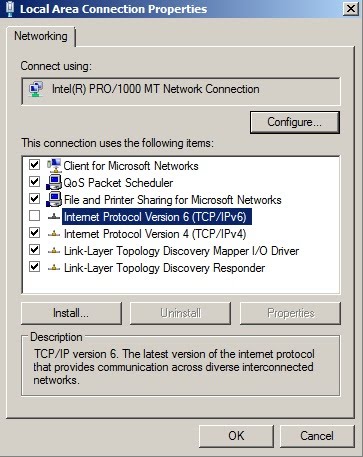
接著,修改機碼來停用IPV6或者修改HOSTS檔案移掉IPV6的設定,完成這些設定,重新執行安裝動作,即可順利完成,錯誤訊息不再發生
HKEY_LOCAL_MACHINE\SYSTEM\CurrentControlSet\Services\Tcpip6\Parameters. In the details pane, click New, and then click DWORD (32-bit) Value. Type "DisabledComponents" (without quotes) and then press enter. Double-click DisabledComponents and type 0xffffffff in Hexadecimal or 4294967295 in Decimal. Close the registry editor.
C:\Windows\System32\Drivers\Etc and open the hosts file in notepad

2010年8月3日 星期二
domain not found
Internet 使用者寄信到公司內部使用者會發生如下的退信訊息,環境為Exchange 2010,無前後端,有Enable Exchange SPAM.
錯誤訊息:
From: Mail Delivery Subsystem [mailto:MAILER-DAEMON@mse.AAA.com] Sent: Wednesday, July 28, 2010 10:18 AM To: abc.lin@BBB.com Subject: 未傳遞的主旨:訂單回覆POO123456789 傳送至下列收件者或通訊群組清單失敗: abc.lin@BBB.com 由於安全性原則的關係,您的郵件並未傳遞。Microsoft Exchange 不會嘗試重新傳遞此郵件。請將下列診斷文字提供給您的系統管理員。 下列組織已拒絕您的郵件: webmail.BBB.com。
Exchange 2010 SPAM誤判造成domain not found的退信紀錄,要解決此問題,請執行uninstall-AntispamAgents.ps1 將SPAM移除,或者調整SPAM SCL值,問題即可解決.
錯誤訊息:
From: Mail Delivery Subsystem [mailto:MAILER-DAEMON@mse.AAA.com] Sent: Wednesday, July 28, 2010 10:18 AM To: abc.lin@BBB.com Subject: 未傳遞的主旨:訂單回覆POO123456789 傳送至下列收件者或通訊群組清單失敗: abc.lin@BBB.com 由於安全性原則的關係,您的郵件並未傳遞。Microsoft Exchange 不會嘗試重新傳遞此郵件。請將下列診斷文字提供給您的系統管理員。 下列組織已拒絕您的郵件: webmail.BBB.com。
Exchange 2010 SPAM誤判造成domain not found的退信紀錄,要解決此問題,請執行uninstall-AntispamAgents.ps1 將SPAM移除,或者調整SPAM SCL值,問題即可解決.
2010年6月16日 星期三
Outlook 2003 連線 Exchange 2010 認證失敗無法登入
因 Exchange 2010,憑證申請支援並且提供了萬用字元憑證,也就是萬用字元的憑證申請與應用,同時申請一張憑證,就可同時簽發給多個網域名稱的服務,也就是讓一個實體伺服器可以擁有多個可執行SSL/TLS實作的url,而這樣往往也會造成Outlook 2003認證失敗無法登入的情形,但是,Outlook 2007&Outlook 2010無法登入的情形確不會發生,如果公司環境已經啟用萬用字元憑證,而使用者使用Outlook 2003認證失敗無法登入,請參考下列圖例,並且調整Outlook Profile設定,將Exchange Proxy的主要伺服器設定,設成萬用字元的憑證格式,譬如 "msstd:*.msft.local",這樣Outlook 2003無法登入的情形就可以解決.


2009年7月27日 星期一
Exchange 2010 New Features
Well, with a new version of Exchange obviously brings a new set of features. While there are a lot of new features, here are just some of the new features:
1. Database Availability Groups – Database Availability Groups combine CCR and SCR functionality to provide a single solution for both scenarios. What happens here is that you install a DAG member and it behind the scenes installs Failover Clustering making the High Availability deployment more intuitive for the administrator. There was one scenario we ran into here where we had two source CCR Clusters wanting to replicate to the same target SCR Standby. The problem here is that when you recoverCMS on the SCR Standby, the replication fails with the other source CCR that was still working becuase the target SCR server can only ever have 1 CMS. DAGs fix that issue.
2. Outlook Web Access Features – There are quite a few new features with OWA. Some features I really like are:
Side-by-side comparison of calendars
Ability to attach messages to messages
Integration with Communicator including presence, chat, and a contact list
Conversation View
Support for multiple browsers such as Firefox and Safari
3. Unified Messaging Features – There are quite a few new features with UM. Some features I really like are:
Message Waiting Indicator
Voicemail Preview – This is essentially a speech to text that will display the text in your e-mail message to get a preview of what the voice mail includes
Personal auto attendants
Protected Voice Mail – Ability to track and restrict where voice mails can go
4. Store Functionality – There are a ton of new features for UM. Some important things to note:
No more Storage Groups
Mailboxes are no longer connected to the server object in which the schema has been flattened to allow for this
I/O Improvements including JBOD support and better support for SATA disks
Being able to run on cheap disks (SATA) and have a backupless organization by having multiple copies stored on DAG members.
5. Administration – There are a ton of additions/enhancements to administration. Some important things to note:
Role Based Access Control (RBAC) – Allows you to create granular permissions on custom groups that you create. This essentially replaces the administration model in Exchange 2007. For example, if you want a help desk group that has access to specific pieces of functionality within Exchange, you can do so.
Exchange Control Panel – Ties into RBAC and shows/hides features you are not given access to.
Audit Logging
6. Other
Multi-Mailbox Search
Text Messaging Integration (SMS)
Moderation and approval of distribution group submissions
Mail Tips – Will notify an Outlook user of an impeding error before it happens so the user doesn’t get a confusing NDR.
For example, if your message size limit is 10MB and the user tries sending a 15MB message, Outlook will notify the user before the user tries to send out the e-mail saving Exchange resources and making the failure experience more intuitive for the end user.
1. Database Availability Groups – Database Availability Groups combine CCR and SCR functionality to provide a single solution for both scenarios. What happens here is that you install a DAG member and it behind the scenes installs Failover Clustering making the High Availability deployment more intuitive for the administrator. There was one scenario we ran into here where we had two source CCR Clusters wanting to replicate to the same target SCR Standby. The problem here is that when you recoverCMS on the SCR Standby, the replication fails with the other source CCR that was still working becuase the target SCR server can only ever have 1 CMS. DAGs fix that issue.
2. Outlook Web Access Features – There are quite a few new features with OWA. Some features I really like are:
Side-by-side comparison of calendars
Ability to attach messages to messages
Integration with Communicator including presence, chat, and a contact list
Conversation View
Support for multiple browsers such as Firefox and Safari
3. Unified Messaging Features – There are quite a few new features with UM. Some features I really like are:
Message Waiting Indicator
Voicemail Preview – This is essentially a speech to text that will display the text in your e-mail message to get a preview of what the voice mail includes
Personal auto attendants
Protected Voice Mail – Ability to track and restrict where voice mails can go
4. Store Functionality – There are a ton of new features for UM. Some important things to note:
No more Storage Groups
Mailboxes are no longer connected to the server object in which the schema has been flattened to allow for this
I/O Improvements including JBOD support and better support for SATA disks
Being able to run on cheap disks (SATA) and have a backupless organization by having multiple copies stored on DAG members.
5. Administration – There are a ton of additions/enhancements to administration. Some important things to note:
Role Based Access Control (RBAC) – Allows you to create granular permissions on custom groups that you create. This essentially replaces the administration model in Exchange 2007. For example, if you want a help desk group that has access to specific pieces of functionality within Exchange, you can do so.
Exchange Control Panel – Ties into RBAC and shows/hides features you are not given access to.
Audit Logging
6. Other
Multi-Mailbox Search
Text Messaging Integration (SMS)
Moderation and approval of distribution group submissions
Mail Tips – Will notify an Outlook user of an impeding error before it happens so the user doesn’t get a confusing NDR.
For example, if your message size limit is 10MB and the user tries sending a 15MB message, Outlook will notify the user before the user tries to send out the e-mail saving Exchange resources and making the failure experience more intuitive for the end user.
訂閱:
文章 (Atom)
-
 錯誤訊息如下: 解決方法: 試試看檢查下面幾項動作 1.Netlogon Service有沒有啟動或者服務重新啟動 2.是否有此值 HKLM\System\CCS\Services\NTDS\Parameters 底下的 "DSA Not Writable...
 -
當在更新 Exchange 2010 SP1 時,會產生下列錯誤訊息,而造成無法繼續更新 SP1,錯誤訊息如下: Some controls aren't valid. Setup previously failed while performing the act...